Real work isn't a prompt chain. It branches, loops, pauses for sign-off — and sometimes it swarms. Workflows are the execution model; four assistants are how you build and run them.
ModelStages · hooks · gates
ScaleSwarms, capped at three
Per agentAny model, any provider
One workflow, top to bottom
The whole shape, in one picture
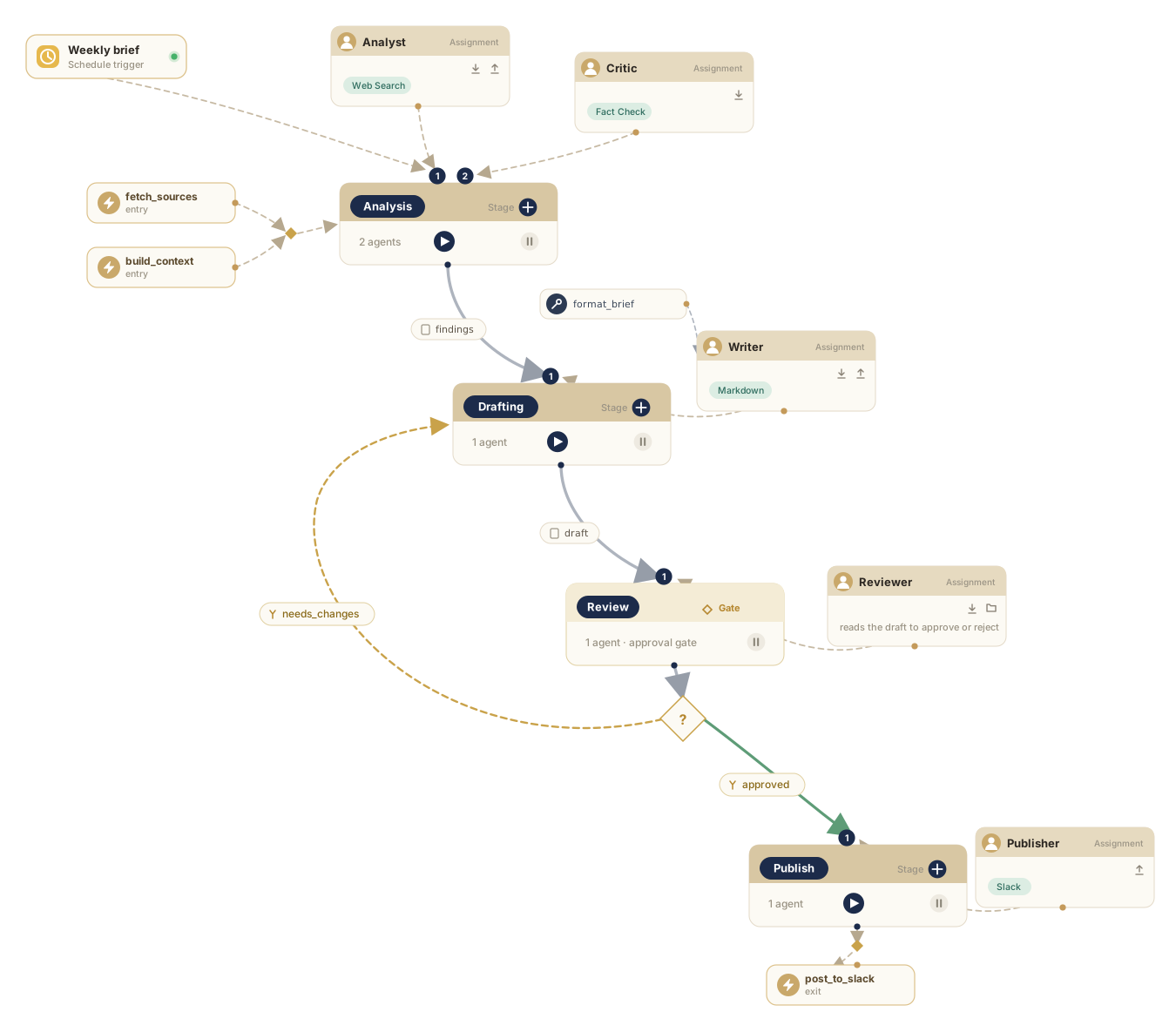
A weekly brief, start to finish. Entry hooks prime the first stage; two agents — an analyst and a critic — share the analysis; a human gate decides the outcome. Approve, and it flows on to publish. Reject, and the draft loops back for another pass.
One workflow, end to end — hooks, a two-agent stage, an approval gate, outcome routing, and a loop back. Simple to read; deep where it counts.
Stages, not spaghetti
Separation of concerns, the way you'd structure a team
Most "AI workflows" are monolithic prompt chains — one long instruction, fingers crossed. An orqo workflow is something else entirely.
A workflow is a sequence of stages — research, analysis, drafting, review, publishing — each with its own agents, its own task, its own boundaries. Separation of concerns, the way you'd structure a real team's process.
Every stage carries entry and exit hooks: plain scripts that fire automatically when a stage begins or ends — no AI needed. Fetch the metrics before the analysts start; validate the output before anything moves on; notify Slack when the draft is done. Infrastructure stays in the hooks; agents stay focused on the work.
Need intelligence at the edges instead of a script? Drop an agent into just the first or last turn of a stage — to prep the inputs or tidy the output — without it sitting through the whole stage.
And while you build, you never wait on the whole pipeline: run any stage on its own, as often as you like — no sitting through thirty minutes to find out whether stage fourteen behaves.
The pause button your compliance team will love
Gate the agents exactly where you'd gate a human team
This is the mechanical answer to "can we trust agents with real processes?" You don't trust them blindly. You gate them — exactly where you'd gate a human team.
Approval gate
A blocking exit hook that waits for a human
The workflow stops at the checkpoint and waits — for a human or an external system — before anything proceeds. The response doesn't just unblock the run; it steers it.
Outcome routing
Stages branch on what actually happened
Review passed → publish. Review failed → loop back to drafting with the feedback attached. Edge case detected → skip to escalation. Workflows stop being linear scripts and become adaptive pipelines — with humans holding the gates that matter.
And the human who holds the gate doesn't even have to be in the app. Define a gate as simply as "get Mark's sign-off." Mark isn't logged in — his first channel is WhatsApp, so that's where the request lands. He approves from his phone and the run continues; if he doesn't, the agent asks what needs to change and returns the job for revision.
The agents do the work; the humans hold the gates. That's the whole shape of it: a process you can actually trust because the checkpoints are yours.
When one run becomes a swarm
Parallel work that scales the work, not the chaos
An agent inside a workflow can spawn subagents — parallel workers that can each trigger a full workflow of their own.
The canvas you actually build on: assignments feeding a stage — one carrying a skill, one a Finalizer that judges the result — with hook scripts in and out, and routing that sends the work back round when the outcome isn't good enough.
One coordinator reads a list of five competitors, spawns five researchers, and each launches a complete "Competitor Research" workflow. From a single click, 20+ agents are working across 15+ stages in 5 parallel workflows.
And it can't run away: recursion is capped at three levels. Swarms scale the work, not the chaos.
Within one team — one stage, one conversation — every agent can run on a different model from a different provider. And the same agent can switch providers between runs without changing anything about who it is.
Here's how: an agent's context isn't stored in any provider's format. orqo engineers it on the fly into a proprietary, normalized context model, then translates that to whatever API the agent is pointed at — Anthropic, OpenAI, Google, or a local model — at the moment it runs. The researcher is fueled by Google on one run; swap the model and provider, and the same researcher runs under OpenAI on the next — same role, same skills, same memory, a different engine underneath.
So you can mix freely — the director on Claude, the analysts on GPT, the researchers on Gemini, the agent touching sensitive data on a local Llama that never leaves your hardware — and swap any of them between runs to compare cost, speed, and quality. The run metrics tell you exactly what changed. Every major provider plugs in directly, and OpenRouter opens 300+ models besides.
Where the work actually runs
Your agents do real work — on a machine you choose
Agents don't just talk. They run commands, read and write files, install packages, execute code. All of that happens on a runtime — an execution environment you point them at — and it runs there, never on the orqo system itself.
A runtime in the cloud
A managed sandbox, or any server you can SSH into
Spin up a fresh managed sandbox in a click — orqo provisions it through Daytona, the fastest way to get a disposable runtime — or point orqo at a build server, a VM, a box you already run. Agents get a real shell — clone the repo, run the tests, build the artifact — with your credentials injected as environment variables, so the usual tools just work.
Your own machine
The ORQO Bridge turns your laptop into a runtime
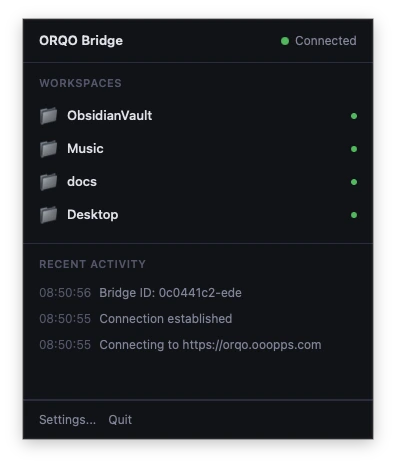
Install a tiny desktop app, pick the folders to expose, and they appear in orqo as runtimes. The app connects outward — no open ports, no firewall rules, no NAT to wrangle. Your local codebase, your Obsidian vault, an on-prem file share — each becomes a workspace your agents can read, write, and run, while it stays on your hardware.
The ORQO Bridge in the menu bar — four local folders shared as runtimes, connected outbound to orqo.
To the engine, all three are the same runtime: exec a command, read a file, write a file — the transport differs, the operations don't. So an agent built against a cloud sandbox runs unchanged against your laptop. Your code executes where you choose, and orqo is never the host. Run it where your data lives
The few you talk to
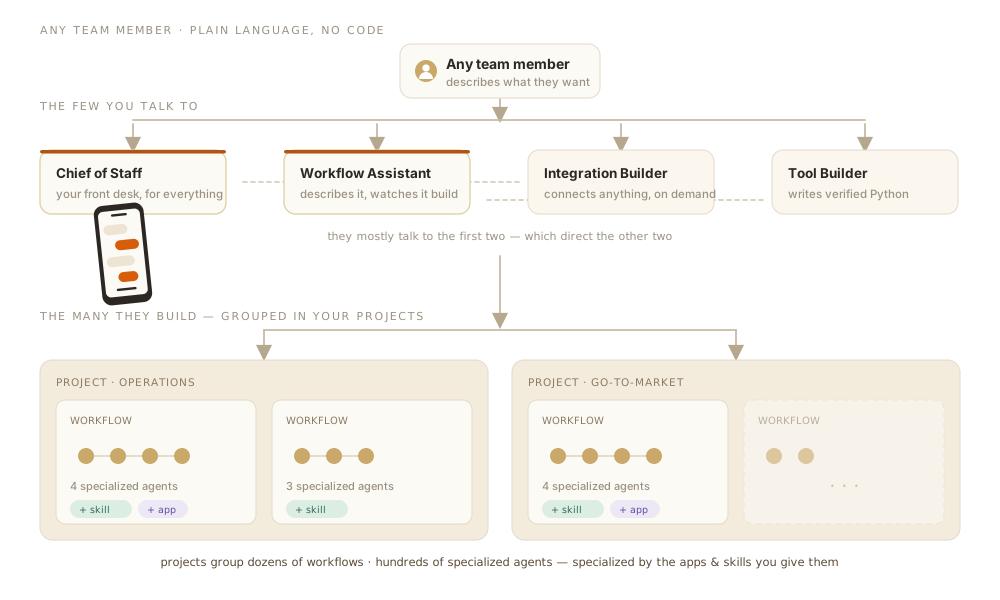
Four AI specialists behind one front desk
Stop counting agents. The market sells rosters of pre-built "specialists"; orqo gives you four assistants you talk to in plain language, no code. None of the four do your actual work — they build the agents that do: researchers, critics, domain experts, as many as a workflow needs. You talk to the four; they assemble and run the hundreds, each specialized by the apps and skills the job calls for.
You describe outcomes to the few; the few build and run the many.
01
Chief of Staff. Your organization's front desk and your AI right hand — your first address. Reach it from the dashboard, Slack, WhatsApp, Telegram, email, or the API: voice in, voice out, wherever you already are. It answers from the knowledge graph, triggers workflows, reports progress in real time, and remembers who it's talking to — each person's map, private and growing.
02
Workflow Assistant. Describe it, watch it build. The visual builder renders live in front of you, stage by stage, agents assigned, tools wired, as the assistant works. Refine in plain language ("add an approval gate before the Slack post"). The Runner card means anyone can run a workflow; the Workflow Assistant means anyone can build one.
03
Integration Builder. The connector no catalog will ever have, because it's yours. Name a platform and it builds the integration on demand — researched, coded, verified, and shipped as an installable Skill. Minutes, not a feature request. How integrations get built
04
Tool Builder. Python without writing Python. It writes the code, runs it through a 5-phase verification pipeline, and wires it into your workflow. The 98% never see source; the 2% who want to lift the hood get the full Tool Factory in the Developer Portal — same verification pipeline, browser-based editor, no ticket, no CI.
Those agents live in teams — and a team is a squad, not a fixed lineup. Each workflow fields the agents that match it: five of eleven on one, three on another, the same specialist playing across several. You never manage the roster; you describe the outcome, and the lineup forms around it.
None of it is a black box, either. Auto-built is the fast path, never a cage: every stage, agent, prompt, tool, and integration assignment is yours to open, adjust, or build by hand in the web UI. The assistants just get you to a working draft faster. What makes an agent an agent
You talk to one; the right one shows up, conversation intact. The chat drawer is available from every page and pre-selects the specialist that fits where you are — it feels less like operating software and more like working with a team that happens to be very fast. When something's missing, the four hand the request between them without you lifting a finger. The full integrations argument
The chain in action
The assistants compose
Send a voice note from the car; the meeting brief is ready before you park.
The Chief of Staff hands the workflow change to the Workflow Assistant; the missing threshold-check tool goes to the Tool Builder; verification runs; the workflow updates. By the time you check back, it's live — and the run history will show you what it did.
The system in one sentence
You describe outcomes; the four build the staff, and the staff does the work
Workflows give the work its shape — stages, hooks, gates, swarms. The assistants give it a voice you can talk to. Put them together and a single sentence becomes a running organization. Claim your slot